What Makes a Clean Webflow Build? Structure, Classes, and Client-First
A Webflow site can look polished and still be difficult to maintain. Learn what clean architecture means beneath the visual design.
April 27, 2026
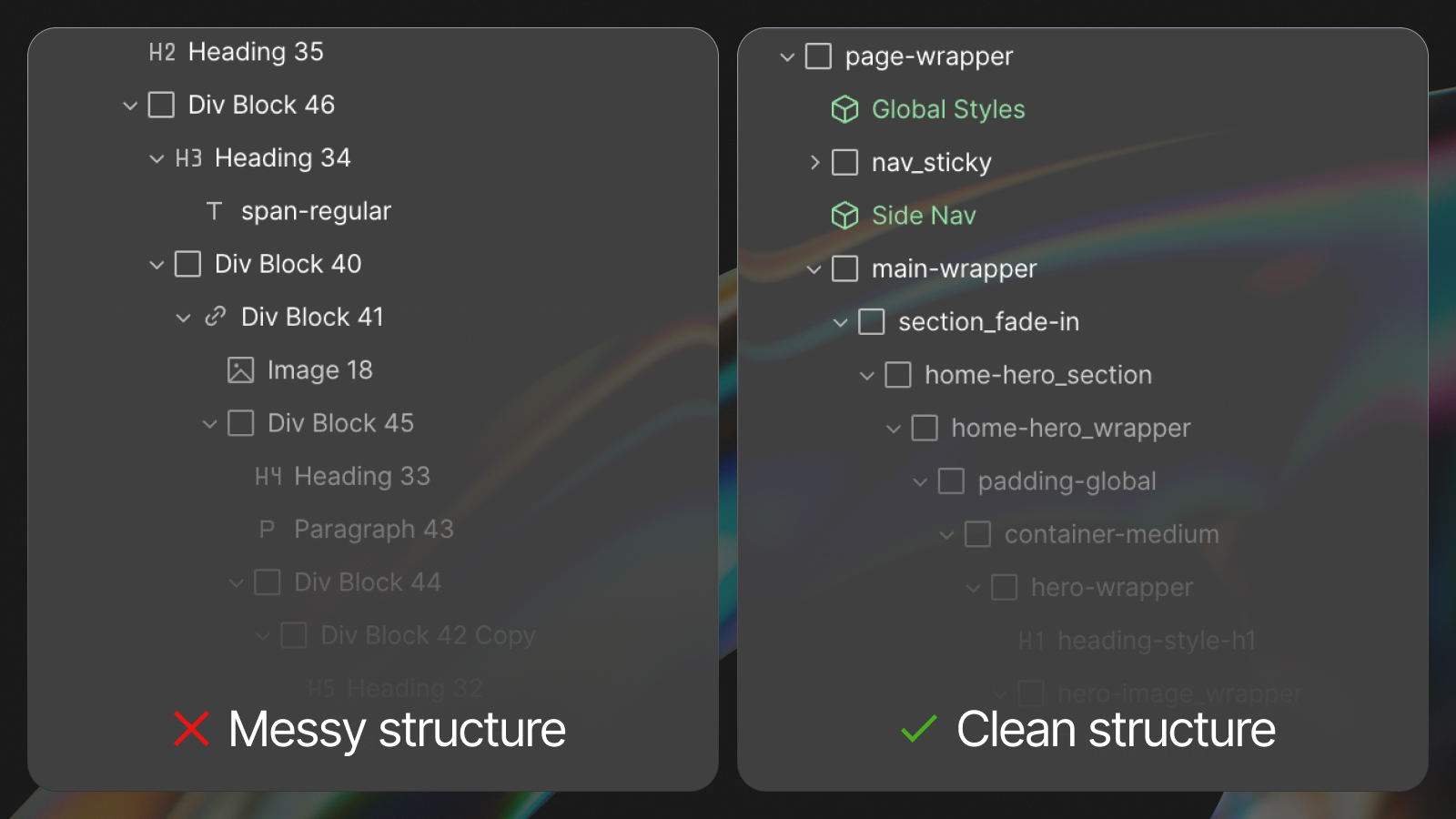
A clean Webflow website is not defined only by what visitors see.
A project can look polished on the published site while being chaotic inside the Designer: random class names, duplicated styles, unnecessary wrappers, disconnected components, and hundreds of elements that are difficult to understand.
That hidden structure affects more than developer preference. It determines how expensive the website is to maintain, how safely it can scale, and how quickly another person can work on it.
Visual quality and build quality are different
Visual design answers questions such as:
- Is the hierarchy clear?
- Does the website feel aligned with the brand?
- Are layouts responsive?
- Are interactions useful and intentional?
Build quality answers a different set of questions:
- Can another developer understand the project?
- Can global styles be changed safely?
- Are repeated patterns actually reusable?
- Can marketing create new pages without duplicating technical debt?
- Does the structure remain predictable across breakpoints?
- Will the project still be manageable after a year of changes?
A professional Webflow delivery needs both.
Common signs of a messy Webflow project
Random class naming
Names such as Div Block 534, new-class-copy-7, or homepage-section-final give no reliable information about purpose or reuse.
The problem is not cosmetic. Unclear naming makes it harder to determine whether a class can be edited, reused, or deleted safely.
Duplicated styles
Two elements may look identical but use separate classes with the same declarations. As duplication grows, global changes become slower and the generated CSS becomes harder to manage.
Unnecessary wrappers
Wrappers are useful when they control layout, positioning, clipping, or spacing. They become harmful when they exist only because the builder kept adding divs without understanding the structure.
Excessive nesting increases DOM complexity and makes responsive debugging harder.
Page-specific systems
If every page uses a different container, spacing method, heading treatment, or card structure, the project has no shared foundation. Each new page becomes another custom implementation.
Hardcoded repeated content
Manually duplicating testimonials, service cards, team members, or article metadata creates inconsistencies and makes future updates unnecessarily risky.
Components without a strategy
Creating a component does not automatically create a scalable system. A component with too many uncontrolled properties can be as confusing as duplicated sections. Components need clear responsibilities, safe variants, and consistent internal structure.
The business cost of poor Webflow architecture
Messy builds create compounding costs.
- A minor rebrand takes longer because colors and typography are scattered.
- A new landing page requires copying old sections and repairing inconsistencies.
- Performance work becomes harder because nobody knows which assets and scripts are essential.
- Editors avoid making changes because the project feels fragile.
- New developers spend paid time reverse-engineering the site.
- Eventually, someone recommends rebuilding instead of extending the existing system.
The website may have been cheaper to launch, but it becomes more expensive every time the business needs to change it.
What a clean class system should achieve
A class system is not valuable because it follows a fashionable naming convention. It is valuable because it gives the project shared rules.
A good system should define:
- How page sections are structured.
- How containers and horizontal padding work.
- How vertical spacing is applied.
- How typography styles are named and reused.
- How component classes differ from utility classes.
- How responsive adjustments are handled.
- How developers identify global versus local styles.
The goal is predictability. A developer should be able to open an unfamiliar page and understand how it is assembled.
Why we use Client-First as a foundation
We use Client-First by Finsweet as the foundation for many Webflow builds because it establishes a shared organizational system.
The official Client-First documentation defines its goals as creating an organization system, standardizing core page structure, establishing a class strategy, and producing scalable, manageable Webflow projects.
Those goals matter more than copying a set of class names.
A correct Client-First implementation typically creates:
- Consistent section and container structure.
- Clear component naming.
- Reusable spacing and typography utilities.
- Predictable global styles.
- A lower learning curve for other Webflow specialists.
Client-First is not the only possible system. A disciplined custom framework can also work. The requirement is that a real system exists and is applied consistently.
Use variables for global design decisions
Colors, spacing values, typography settings, radii, and other repeated tokens should be managed globally where practical.
This makes changes safer. A brand color should not require searching through hundreds of classes. A spacing scale should not depend on developers remembering arbitrary pixel values.
Variables also make the design system easier to explain during handoff because global decisions are visible in one place.
Build reusable components around real patterns
Not every section should become a component. Reuse should follow actual repeated behavior.
Good candidates include:
- Navigation and footer systems.
- Calls to action.
- Testimonial cards.
- Article and case-study cards.
- Forms and form states.
- Logo rows.
- Pricing or comparison modules.
- Repeated hero and content layouts with controlled variants.
A component should make future work easier, not force every use case into an overcomplicated universal block.
Connect clean structure with CMS architecture
Classes and components control presentation. CMS controls structured content. Both systems need to align.
For example, a case-study card component may expect a CMS item containing a title, industry, service, image, short result, and link. The component remains visually consistent while the CMS supplies reusable content.
This is why clean development cannot be separated from Webflow CMS and architecture planning.
How to audit an existing Webflow build
Use this practical review:
- Open several pages and compare their section structure.
- Check whether identical elements share classes and components.
- Review class names for purpose and consistency.
- Identify duplicated color, spacing, and typography values.
- Look for unnecessary wrappers and extreme nesting.
- Check whether repeated content is hardcoded instead of CMS-driven.
- Review mobile overrides for conflicting or redundant styles.
- Inspect unused interactions, scripts, assets, and classes.
- Test whether a global visual change can be made from one place.
- Ask whether a new developer could understand the build without a lengthy explanation.
Clean structure is part of the deliverable
A website is not finished when the published pages look correct. It is finished when the system behind them is understandable, maintainable, responsive, and ready for realistic future changes.
That quality may be invisible during a sales presentation, but it becomes obvious after launch.
Our Webflow development approach uses structured classes, reusable components, scalable CMS architecture, and documented handoff. Review the resulting websites in our project archive.