How We Improved Mobile PageSpeed from 63 to 93 Without a Redesign
A practical Webflow performance case study covering LCP prioritization, media compression, script loading, and background video optimization.
July 7, 2026
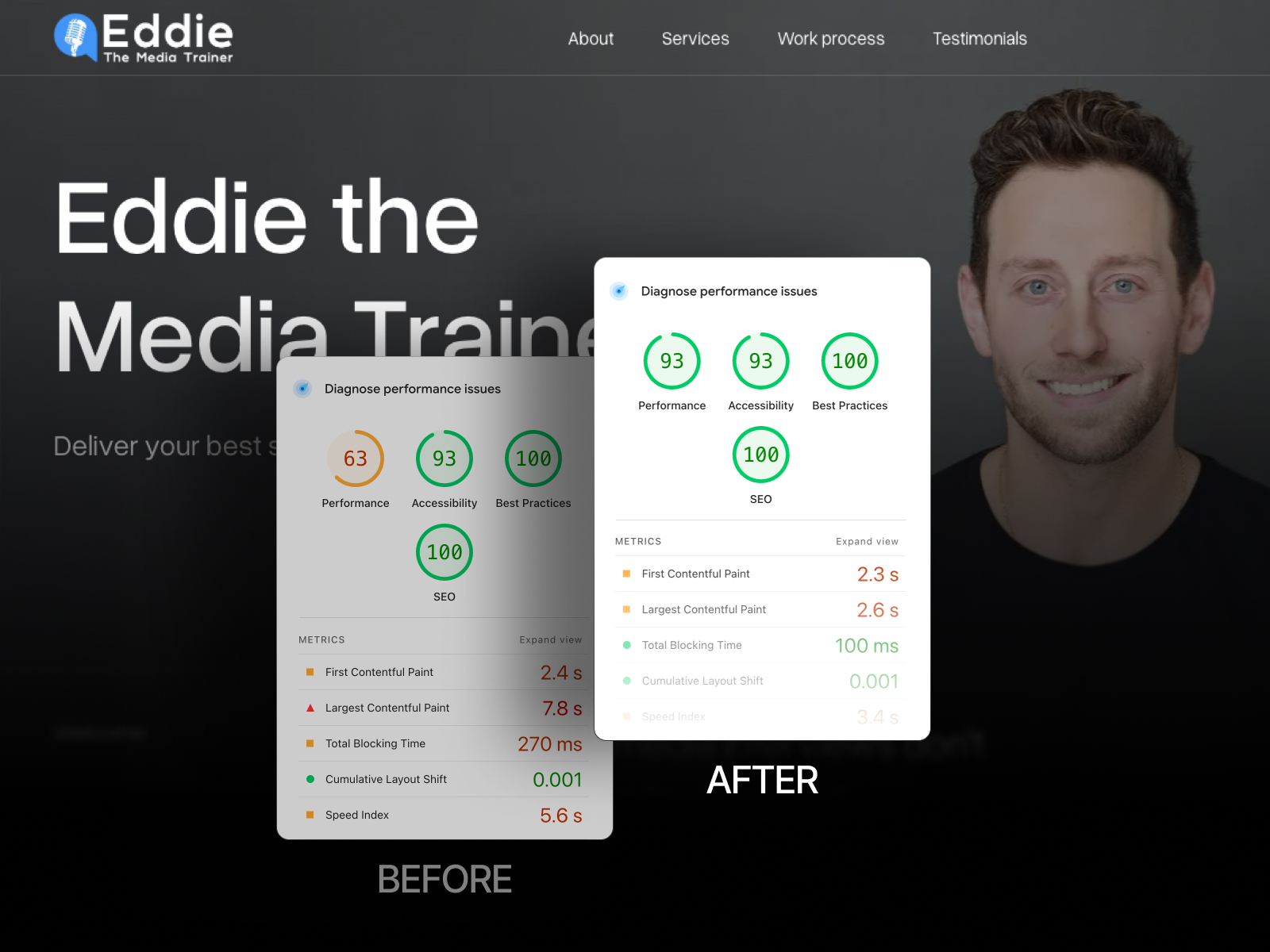
We improved the mobile PageSpeed Insights performance score of a client landing page from 63 to 93 without redesigning the page, removing its analytics setup, or rebuilding the website.
The visual design stayed the same. The tracking requirements stayed the same. The improvement came from identifying which resources were delaying the initial experience and changing how they loaded.
This distinction matters because performance problems are often treated as a reason to rebuild. Sometimes the architecture genuinely requires deeper work. In many cases, the largest gains come from a focused audit and a small number of precise changes.
PageSpeed score and Core Web Vitals are not the same thing
PageSpeed Insights combines different kinds of information.
The Lighthouse performance score is a lab result produced under simulated conditions. Core Web Vitals field data, when available, reflects real Chrome users over time.
A score of 93 is useful evidence that the tested page became substantially lighter and faster under the same lab conditions. It should not be presented as proof that every real user experiences the page identically.
For a complete performance assessment, review both lab diagnostics and field metrics such as:
- Largest Contentful Paint (LCP)
- Interaction to Next Paint (INP)
- Cumulative Layout Shift (CLS)
Google's Web Vitals guidance recommends an LCP of 2.5 seconds or less for a good user experience, measured at the 75th percentile of page loads.
The constraints of the project
The landing page already had a finished design and active marketing tracking. Replacing the layout or deleting essential scripts was not an acceptable solution.
The task was to preserve:
- The existing visual design.
- The hero section and media direction.
- Lead-generation tracking.
- Calendly and form behavior.
- The client's existing Webflow setup.
That forced the optimization work to focus on loading order, media weight, and non-critical behavior.
Step 1: Identify the actual LCP element
Largest Contentful Paint measures when the largest visible content element in the initial viewport is rendered. On marketing pages, this is frequently the hero image, a large text block, or a video poster.
Optimizing random images below the fold does little if the browser is still discovering the hero asset too late.
We first confirmed which element was becoming the LCP candidate and reviewed:
- How it was referenced in the page.
- Whether the browser discovered it immediately.
- Whether it was being lazy-loaded incorrectly.
- Whether the source dimensions and file size were appropriate.
- Whether competing scripts and assets delayed its request.
Step 2: Prioritize the hero image correctly
Above-the-fold media should not be treated like content far below the viewport.
Common mistakes include:
- Applying lazy loading to the LCP image.
- Using an oversized source file.
- Loading the asset through CSS when a direct image element would be discovered earlier.
- Serving one large image to every viewport.
- Allowing less important requests to compete for bandwidth.
The official web.dev guide to optimizing LCP recommends minimizing resource load delay and avoiding techniques that postpone discovery of the LCP resource. In suitable cases, fetchpriority="high" can tell the browser to prioritize the key image.
We adjusted the hero image strategy so the browser could request the important asset earlier while keeping non-critical imagery lazy-loaded.
Step 3: Clean up non-critical loading behavior
Marketing pages often accumulate scripts over time:
- Analytics
- Tag management
- Scheduling widgets
- Embedded social content
- Animation libraries
- Form scripts
- Heatmaps and advertising pixels
Some are necessary. Necessary does not mean they all need to execute before the primary content becomes visible.
We reviewed which scripts affected the initial render and changed the loading sequence where possible. The goal was not to remove tracking, but to prevent non-critical behavior from competing unnecessarily with the content users came to see.
Depending on the script, useful techniques may include:
- Using
deferorasyncappropriately. - Moving non-critical code closer to the end of the document.
- Initializing widgets only after user interaction.
- Delaying below-the-fold embeds.
- Removing duplicate scripts and unused integrations.
Step 4: Compress heavy media assets
Large images and videos can dominate mobile transfer size.
We reviewed the actual rendered dimensions and compressed assets accordingly. A 2500-pixel image should not be sent to a mobile container that displays it at a fraction of that width unless there is a clear reason.
For images, the practical process includes:
- Resize to realistic maximum display dimensions.
- Use efficient formats such as WebP or AVIF where appropriate.
- Preserve enough quality for the design without retaining invisible detail.
- Provide responsive variants.
- Lazy-load images that are genuinely below the fold.
Compression should be judged visually. The goal is not the smallest possible file. It is the smallest file that preserves the intended experience.
Step 5: Replace heavy native background video behavior
Background video can create a strong first impression, but it is one of the easiest ways to overload a mobile page.
A typical implementation may start downloading a large video before the user needs it. It may also load different media resources even when a static poster would be more appropriate for the device or connection.
We replaced the existing behavior with a lighter lazy-loading setup. The page could show an immediate visual state while postponing the heavier video request until it was appropriate.
A robust background-video strategy should consider:
- A compressed poster image.
- Reduced video dimensions and bitrate.
- Short duration and no unnecessary audio track.
- Different behavior on mobile.
- Loading after critical content.
- Respect for reduced-motion preferences.
What we did not do
We did not chase a score by damaging the page.
We did not:
- Remove essential analytics.
- Strip away the visual identity.
- Delete every animation.
- Replace the complete Webflow project.
- Hide content from the test.
Performance optimization should improve the real experience, not merely manipulate a diagnostic tool.
How to prioritize performance fixes
A useful order of operations is:
- Confirm the page's business-critical functionality.
- Identify the LCP element and its request chain.
- Reduce the weight of above-the-fold media.
- Prevent critical assets from being lazy-loaded.
- Delay non-critical embeds and scripts.
- Remove duplicate or unused resources.
- Reserve space for media to reduce layout shifts.
- Retest on mobile and inspect the new bottleneck.
- Review real-user data after enough traffic has accumulated.
Performance work is iterative. Once the largest bottleneck is removed, another resource may become the limiting factor.
When optimization is enough and when a rebuild is justified
Focused optimization is often enough when the site has a fundamentally sound structure but suffers from heavy assets, poor loading order, or accumulated third-party scripts.
A deeper rebuild may be justified when:
- The class and DOM structure are severely duplicated.
- Every page loads global code it does not use.
- The website depends on outdated or conflicting scripts.
- Responsive images and components were not planned at all.
- Routine edits repeatedly reintroduce performance problems.
The result
After prioritizing the LCP hero asset, cleaning non-critical loading behavior, compressing heavy media, and replacing the background-video loading strategy, the mobile Lighthouse performance score increased from 63 to 93.
The more important outcome was not the number itself. The landing page became faster without losing the design, tracking, or functionality the client needed.
Performance is part of our Webflow development and technical QA process. Related launch and optimization work can be found in our client projects.